
If you own an Apple computer, you need to be aware of an increasingly common scam going around that could allow a bad actor to gain control of your Mac. It’s known as the “copy-paste” scam, and it has been perpetrated so often that earlier this year, Apple added safeguards to help unsuspecting users avoid becoming victims. Here’s what you need to know about the Apple copy-paste scam, and how you can protect yourself against it.
What is the Apple copy-paste scam?
The Apple copy-paste scam is a tactic scammers use to trick you into granting them remote access to your Apple computer, whether it’s a MacBook, iMac, Mac mini, or Mac Studio.
At the heart of the scam is a specific command that a scammer gets you to copy and paste into the Terminal. Many Mac users would never have used the Terminal before being asked to do this. It’s an app geared primarily for power users that lets you control your Mac via text commands instead of clicking on buttons and other graphical user interface elements.
While Terminal is a powerful tool for advanced Mac users, using it without proper knowledge can cause unintended consequences for your Mac’s operation or its data. Worse, if specific Terminal commands are entered, they can install malware or grant people remote access to your Mac and all its data—and you’ll likely never even know it.
Such access could allow scammers to extract your personal files, including documents, emails, photos, financial data, contacts, and more. The Terminal command could also install software that logs your keystrokes, so a scammer knows every word you type in any app. The scammer could also remotely shut down your Mac and lock you out of its data until you agree to pay a ransom.
Like the “Apple High Alert” scam, the copy-paste scam doesn’t take advantage of any inherent weaknesses in your Mac’s security. Instead, it is a phishing endeavor that uses social engineering to trick you into entering specific Terminal commands, allowing the scammer to carry out their attack.
How does the Apple copy-paste scam work?
The maneuver is known as the “copy-paste” scam because its main attack vector is getting you to copy a nefarious Terminal command from one of many possible sources: an email or text the scammer sends you, an online forum comment they’ve left, a webpage they’ve set up that portrays the command as a valid troubleshooting step, or a chatbot that recommends the bad command through a method known as indirect prompt injection.
Alternatively, scammers sometimes use phone calls disguised as tech support: A live voice will instruct you to type the command into the Terminal letter by letter.
The scammer’s instructions will usually begin by telling you to open the Terminal app, in your Utilities folder inside the Applications folder. They will then tell you to copy and paste or manually enter one or more specific Terminal commands in succession, ostensibly to help secure your Mac or fix an issue you are having with it. But in reality, the commands you enter will either grant the scammer remote access to your Mac or allow them to extract sensitive data from it.
How do I know if I am a target of an Apple copy-paste scam?
Until recently, the only way you could know you were a target of the copy-paste scam was by being aware of Terminal in the first place, and how Terminal commands could be used to install malicious software on your Mac or allow others to remotely access it.
The big tip-off that a scammer was targeting you with this attack would have been you receiving emails, text messages, or phone calls, allegedly from some kind of “tech support” company—or even from purported Apple employees—and instructing you to copy-paste or manually enter specific commands into the Terminal.
Other times—especially if you found the nefarious command in a troubleshooting forum, or the recommendation of a chatbot that merely scooped it up in its training data—there may have been no way for you to know the command could leave you vulnerable.
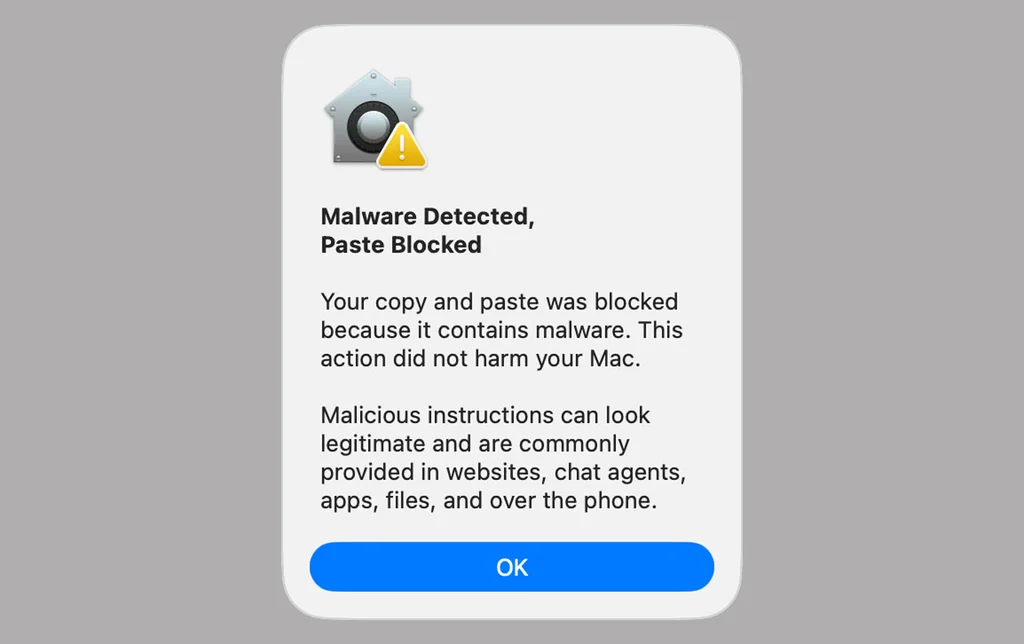
That’s why, with the release of macOS 26.4 this spring, Apple added protections against the copy-paste scam. Now, if you try to paste a command from a website, chatbot, or messaging or email app—and you aren’t a regular Terminal user—the Terminal app will show you a “Possible malware, paste blocked” alert. The alert warns that the command could harm your Mac or compromise your privacy.
You’ll then have the option to paste the command into the Terminal or not. The point here is to get the user to slow down and think about what they are pasting.
And if the Terminal detects that a command or script contains malware, it will automatically block it and show the user either a “Malware detected, paste blocked” or “Malicious script blocked” notification.
What can I do to protect myself from the Apple copy-paste scam?
The best way to protect yourself against the copy-paste scam is to never enter a command into the Terminal until you have personally verified what it will do. If you aren’t 100% certain a Terminal command will not compromise your Mac or its data, never enter it—no matter who is pressuring you to.
Also, keep the following in mind:
- If someone is pressuring you to quickly enter the Terminal command, telling you that time is of the essence, it’s most likely a scam. Scammers use pressure tactics, including a false sense of urgency, to get you to act without thinking.
- Don’t blindly trust a command just because you found it on a Mac or tech forum, or in a post on Reddit. Scammers know that if they leave these commands on popular websites, some people will be duped into copying and pasting them when they are searching for solutions to their Mac’s problems.
- Just because ChatGPT or Google’s Gemini recommends the command doesn’t mean it’s safe. Chatbots sweep up everything in their training data, including incorrect and even nefarious information. Scammers know this, and that by leaving harmful commands online, they may be able to get a chatbot to recommend them to people seeking help.
- If the Terminal app ever displays the “Possible malware, paste blocked” notification, you should decline to continue pasting unless you are certain the command will not harm your Mac or you.