Close Menu
    Facebook X (Twitter) Instagram
    TRENDING :
    • How to Make Money on Social Media Without a Huge Following
    • 28-Year-Old’s Side Hustle Hit $125K in Year 1: More Than Matcha
    • How to Speak Honestly at Work Without Derailing Your Career
    • Silicon Valley Doesn’t Have a Monopoly on Startup Wisdom
    • The EU Will Block Peace Between Russia & Ukraine
    • Laid-Off Marketer’s Apartment-Made Pizzas Sell Out in 30 Seconds
    • 4 Questions That Separate Real Founders From Performers
    • $14 Billion Company Is Giving 7,000 Employees a Day Off to Game
    Compatriot Chronicle
    • Home
    • US Politics
    • World Politics
    • Economy
    • Business
    • Headline News
    Compatriot Chronicle
    Home»Business»Google Chrome just dropped 3 new time-saving features
    Business

    Google Chrome just dropped 3 new time-saving features

    March 2, 20263 Mins Read
    Share Facebook Twitter Pinterest LinkedIn Tumblr Telegram Email Copy Link
    Follow Us
    Google News Flipboard
    Share
    Facebook Twitter LinkedIn Pinterest Email


    Let’s be honest: The web browser is the modern-day operating system for everything from managing spreadsheets to pretending to work while reading tech blogs.

    Google knows this. That’s why the Chrome team announced a trio of new productivity features designed for people who basically live inside their browsers. Best of all? They’re actually quite useful.

    Here’s what you need to know to get your tab-hoarding, PDF-losing life back in order.

    Split View

    You know the drill. You’re trying to reference a document while writing an email, or maybe you’re watching a tutorial while trying to write code. You end up clicking back and forth between two tabs until your eyes cross.

    Enter Split View. It does exactly what it says on the tin: It lets you view two tabs side-by-side in a single window. No more dragging and resizing windows manually like it’s 2004.

    The feature is built into Chrome now, creating a single, organized workspace that keeps you focused.

    Unfortunately, it’s not super obvious. To enable it, you’ll need to open a new tab, then right-click said tab, and select “Add tab to new split view.”

    You’ll then have to select which of your open tabs to add to the other split-view pane. It takes about three or four more clicks than it should, but there you have it.

    PDF Annotations

    File this one under “Finally!”

    The Chrome PDF Viewer has always been a handy way to look at documents, but looking was about all you could do. If you needed to highlight a line or add a quick note, you had to download the file, open a dedicated PDF application, make the change, save it, and probably upload it again.

    Exhausting.
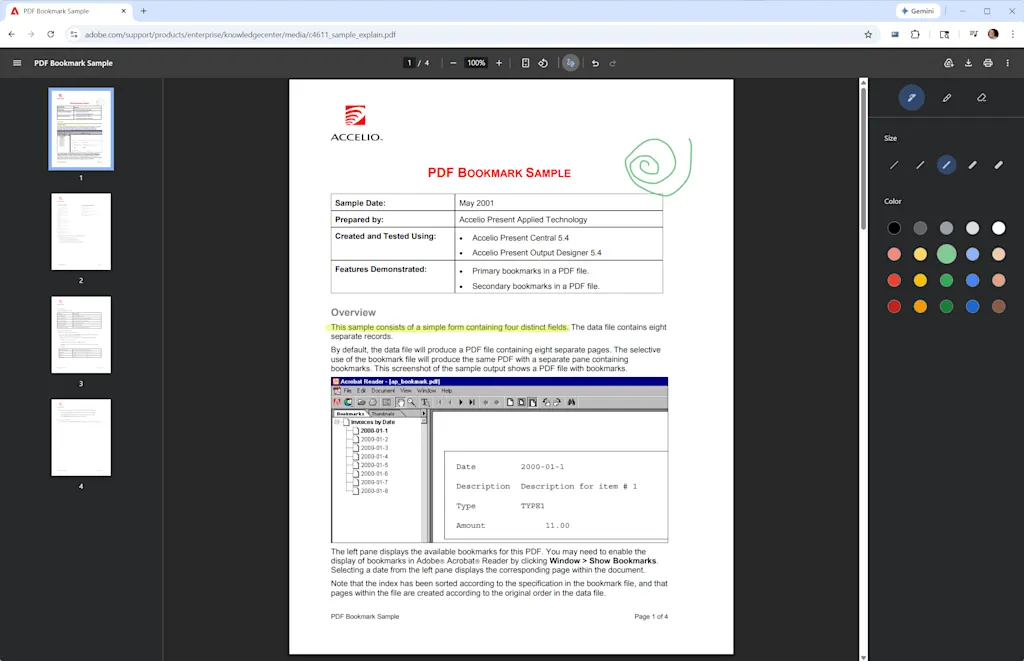
    Now you can highlight text and add handwritten notes to PDFs directly inside the browser by clicking the little squiggle icon at the top of any open PDF.

    This stuff isn’t as robust as Microsoft Edge’s PDF features, which let you enter typed text into form fields as well. But it’s still a tiny friction remover that’s going to save an unreasonable amount of annoyance.

    Save to Drive

    If your Downloads folder looks like a digital landfill of files named “Invoice_Final_V4(1).pdf,” you’re not alone. You download an important file, completely lose track of where your computer put it, and spend 10 minutes searching your hard drive.
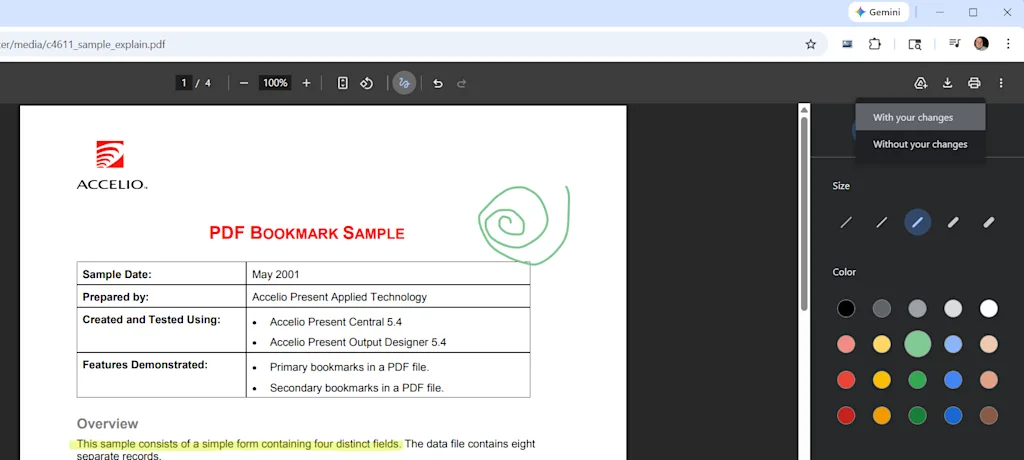
    To fix this, Chrome has added a direct “Save to Google Drive” feature. When you’re looking at a PDF, you can bypass the local download entirely by clicking the Google Drive icon in the upper-right corner.

    Chrome will whisk the file away to a dedicated “Saved from Chrome” folder right in your Google Drive. It’s instantly backed up, organized, easily searchable, and available on whatever device you decide to pick up next.


    Source link

    Share. Facebook Twitter Pinterest LinkedIn Tumblr Email

    Related Posts

    How to Make Money on Social Media Without a Huge Following

    November 12, 2026

    28-Year-Old’s Side Hustle Hit $125K in Year 1: More Than Matcha

    November 12, 2026

    How to Speak Honestly at Work Without Derailing Your Career

    November 12, 2026
    Top News

    How too much collaboration destroys creativity—and how to fix that

    By Staff WriterDecember 16, 2025

    I have a confession to make. For most of my career in creative leadership roles,…

    Market Talk – September 18, 2025

    September 18, 2025

    Meta stock price: META rises on report that Zuckerberg will cut up to 30% of metaverse division

    December 4, 2025

    5 Effective Employee Review Template Examples You Can Use

    September 14, 2026
    Top Trending

    How to Make Money on Social Media Without a Huge Following

    By Staff WriterNovember 12, 2026

    Key Takeaways Follower count is a vanity metric. Trust and engagement are…

    28-Year-Old’s Side Hustle Hit $125K in Year 1: More Than Matcha

    By Staff WriterNovember 12, 2026

    Key Takeaways Goldwasser leveraged her marketing and consulting experience to build More…

    How to Speak Honestly at Work Without Derailing Your Career

    By Staff WriterNovember 12, 2026

    Key Takeaways There’s such a thing as being too honest in the…

    Categories
    • Business
    • Economy
    • Headline News
    • Top News
    • US Politics
    • World Politics
    About us

    The Populist Bulletin serves as a beacon for the populist movement, which champions the interests of ordinary citizens over the agendas of the powerful and entrenched elitists. Rooted in the belief that the voices of everyday workers, families, and communities are often drowned out by powerful people and institutions, it delivers straightforward, unfiltered, compelling, relatable stories that resonate with the values of the American public.

    The Populist Bulletin was founded with a fervent commitment to inform, inspire, empower and spark meaningful conversations about the economy, business, politics, inequality, government accountability and overreach, globalization, and the preservation of American cultural heritage.

    The site offers a dynamic mix of investigative journalism, opinion editorials, and viral content that amplify populist sentiments and deliver stories that echo the concerns of everyday Americans while boldly challenging mainstream narratives that serve the privileged few.

    Top Picks

    How to Make Money on Social Media Without a Huge Following

    November 12, 2026

    28-Year-Old’s Side Hustle Hit $125K in Year 1: More Than Matcha

    November 12, 2026

    How to Speak Honestly at Work Without Derailing Your Career

    November 12, 2026
    Categories
    • Business
    • Economy
    • Headline News
    • Top News
    • US Politics
    • World Politics
    Copyright © 2025 Populist Bulletin. All Rights Reserved.

    Type above and press Enter to search. Press Esc to cancel.