

There’s an entire universe of great music outside the confines of Spotify and YouTube Music, and you don’t need a subscription to access it.
Over the years, live concert tapers have archived thousands of shows from artists like Grateful Dead, Phish, Billy Strings, and beyond. While getting a hold of these shows once required you to scour through sketchy torrent sites—or, further back in time, exchanging tapes with strangers in the mail—the entire process has now been streamlined into a slick mobile app.
The only hard part is deciding what you should listen to first.
This tip originally appeared in the free Cool Tools newsletter from The Intelligence. Get the next issue in your inbox and get ready to discover all sorts of awesome tech treasures!
Free the music, man
To access thousands of concert recordings on-demand, check out Relisten.
➜ Relisten streams decades’ worth of live concert tapings. It’s available on the web, on Android, and on iOS.
⌚ Playing a concert takes mere seconds, with no signup required.
The app is completely free, too, with no ads, in-app purchases, or subscriptions.
After installing the Relisten app (or heading to the website), you’ll see a big list of featured artists to choose from. You can also tap the search button to see a list of all available artists (more than 4,000 in total).
✅ Just pick an artist, select a year, and then find a show to start listening to.
☝️ If you’re not sure where to start, look to the “Top Rated” section or the “Popular and trending shows” heading on each artist page. You can also seek out shows marked with “SBD,” as these tend to have crisper sound quality.
Relisten also has a handy favorites function, found by tapping the heart icon on each page. Marking an artist as a favorite will pin it to the top of the main Artists tab, while marking a show as a favorite will add it to your “My Library” tab. Just note that this will not sync across devices, as the app has no account system.
The app supports offline listening as well. Hit the download icon on any show page, and it’ll appear in the Offline tab.
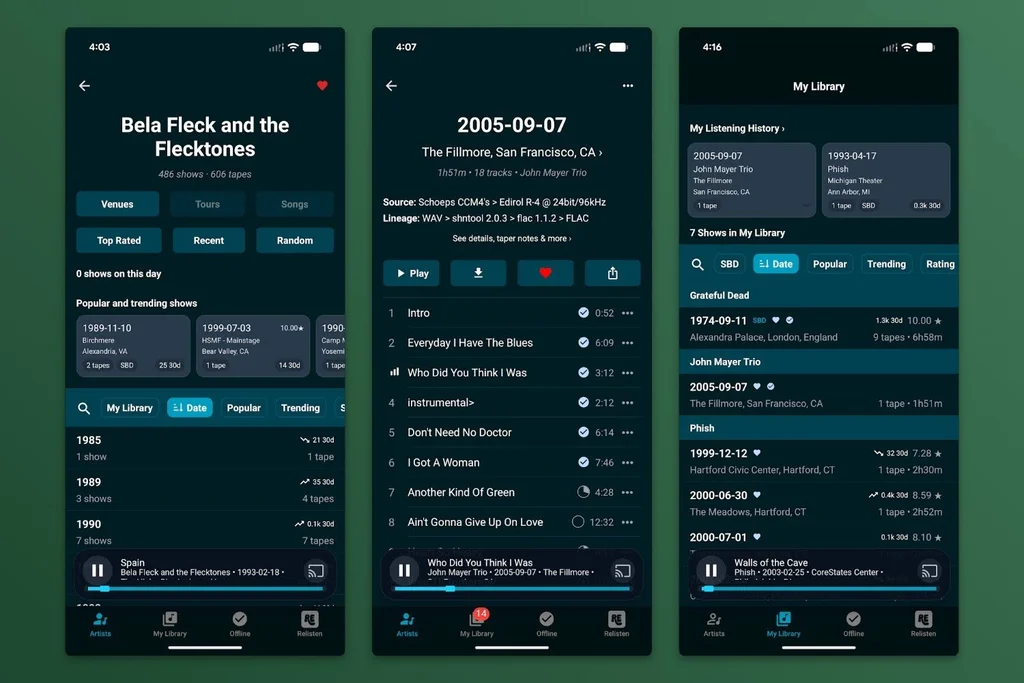
If you want to listen on connected speakers at home, Relisten supports both AirPlay and Google Cast. Just look for the cast icons in the playback bar. There’s also an integration with Sonos speakers, allowing you to browse and play concerts through the Sonos app. Apple CarPlay is also supported, though Android Auto support is currently more basic with just play/pause/skip controls.
💡 Where does all this free music come from? It’s entirely sourced from either the Internet Archive’s Live Music Archive (itself recently featured in Cool Tools) or from Phish.in. If you dig into the “details, taper notes & more” section for a particular show, you’ll see links to the original source. In many cases that means you can also download the concert files for your own personal media server or archiving purposes.
Just don’t bother trying to find anyone to trade files with you. That process is thankfully obsolete.
- Relisten is available on the web, on Android, and on iOS as well as for AirPlay, Google Cast, and Sonos speakers.
- It’s completely free to use with no ads, in-app purchases, or subscriptions.
- The project is open-source, and the app doesn’t ask for any personal data. It only collects usage information for diagnostic purposes.
Treat yourself to all sorts of tantalizing tech treasures with the free Cool Tools newsletter—starting with an instant introduction to an incredible audio app that’ll tune up your days in delightful ways.