Close Menu
    Facebook X (Twitter) Instagram
    TRENDING :
    • You can’t recall AI like a defective drug
    • Dollar General closed hundreds of locations after evaluating its store footprint. But there’s an upside
    • Bumble stock is up today. Whitney Wolfe Herd’s solution to ‘swipe fatigue’ might be part of the reason why
    • This new foldable phone may have upstaged Apple in the ‘zero-crease’ wars
    • The X algorithm really is trying to radicalize you—researchers just proved it
    • How silicone wristbands can help scientists monitor ‘forever chemicals’
    • The Pentagon–Anthropic clash is a warning for every enterprise AI buyer
    • Trump, London, Netanyahu, & Neocons
    Compatriot Chronicle
    • Home
    • US Politics
    • World Politics
    • Economy
    • Business
    • Headline News
    Compatriot Chronicle
    Home»Business»This free image toolbox is the perfect Google Photos power-up
    Business

    This free image toolbox is the perfect Google Photos power-up

    November 15, 20254 Mins Read
    Share Facebook Twitter Pinterest LinkedIn Tumblr Telegram Email Copy Link
    Follow Us
    Google News Flipboard
    Share
    Facebook Twitter LinkedIn Pinterest Email


    While I’m happy to extol the powers of the written word, sometimes you need a little something extra to get your point across.

    I’m not just referring to pictures, either, but also to annotations, flowcharts, and freeform drawings. These illustrative tools can be a powerful way to convey your message, whether by themselves or on top of an existing image.

    Allow me to (*ahem*) illustrate exactly what I mean, using a free tool that might end up being the image-editing, markup-magic-creating supplement you never knew you needed.

    This tip originally appeared in the free Cool Tools newsletter from The Intelligence. Get the next issue in your inbox and get ready to discover all sorts of awesome tech treasures!

    The picture of productivity

    Next time you need to mark up an image or feel like rolling your own flowchart, remember this website: Excalidraw.com.

    ➜ Excalidraw is a web-based app that bills itself as a digital whiteboard, but it is actually much more than that. With Excalidraw, you can also import your own images and then insert arrows, boxes, lines, and text—or create completely freeform drawings—all on top of them.

    ⌚ You’ll be ready to start drawing or annotating in just a few seconds. The site is free to use and doesn’t require any logins.

    ✅ To start using Excalidraw, just pick one of the drawing tools at the top of the screen, then click and drag on the canvas to insert it.

    You can easily import any image into Excalidraw and then mark it up in all sorts of interesting ways.
    • To add an image, either click the image icon or—if you’re using the site on a computer and the image is in your clipboard—just hit Ctrl+V or Cmd+V to paste it in.
    • Use the Cursor tool to select items that you want to move or delete, and use the Hand tool to move around the canvas.
    • Excalidraw lets you save works-in-progress as files on whatever device you’re using. Once you’re finished, you can copy the resulting image to your clipboard or export it as an image file.

    ☝️ If you’re an expert at editing photos on your phone—thanks, perhaps, to my colleague JR Raphael’s Android Photography Masterclass—you may wonder why you’d need a separate app for annotating images.

    • For one thing, Excalidraw works on any device, not just your phone or tablet. (I’ve found it especially helpful when marking up screenshots for my own tech advice newsletters.)
    • Excalidraw also supports illustrations without an image, so you can build a flowchart from scratch or doodle away on an infinite canvas.
    • Lastly, Excalidraw has more powerful annotation features than your phone’s photo markup mode, with additional drawing tools and a “Layers” feature for moving elements to the foreground or background.
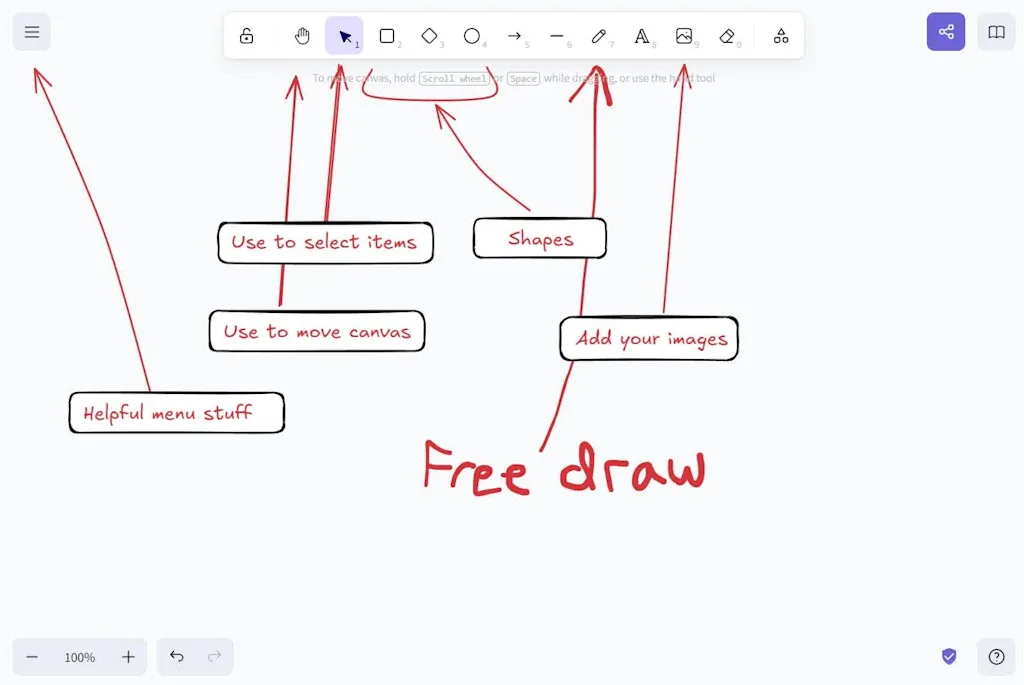
    Excalidraw’s annotation options are especially exceptional.

    💡 Some extra tips to keep in mind when using Excalidraw (some of which will only make sense if you’re using a device with a mouse or keyboard):

    • Right-clicking on the canvas reveals some useful options, including a grid mode and a “Zen” mode that hides the toolbar.
    • Right-clicking individual items is helpful as well, allowing you to duplicate, flip, or move items forward or backward in the scene.
    • While drawing lines or arrows, you can connect them to the edges of a shape, and they’ll stay connected even if you move the shape later.
    • Use Ctrl+Z or Cmd+Z to quickly undo edits.
    • If you ever want to start from scratch, click the menu button in the top-left corner, then select “Reset the canvas.” (But consider saving your work first.)

    💾 To save your creation as an image file, click the menu button and select “Export.” You’ll see a preview of what your image will look like along with some extra options. (Of note: “Embed scene” includes some data in the image file to allow for future editing in Excalidraw.) You can then save the file (as a PNG or .SVG) or copy it to your clipboard for easy sharing elsewhere.

    • Excalidraw.com is entirely web based, though you can install it as a Progressive Web App if you’d like.
    • The site is free to use with no ads, including the ability to save project files to your local device and export images. An optional subscription for $6 per month lets you save files online and access extra features such as presentation mode and team management.
    • Excalidraw requires no sign-in, doesn’t ask for personal information, and advertises end-to-end encryption for drawings.

    Treat yourself to all sorts of brain-boosting goodies like this with the free Cool Tools newsletter—starting with an instant introduction to an incredible audio app that’ll tune up your days in truly delightful ways.


    Source link

    Share. Facebook Twitter Pinterest LinkedIn Tumblr Email

    Related Posts

    You can’t recall AI like a defective drug

    March 12, 2026

    Dollar General closed hundreds of locations after evaluating its store footprint. But there’s an upside

    March 12, 2026

    Bumble stock is up today. Whitney Wolfe Herd’s solution to ‘swipe fatigue’ might be part of the reason why

    March 12, 2026
    Top News

    Market Talk – December 3, 2025

    By Staff WriterDecember 3, 2025

    ASIA: The major Asian stock markets had a mixed day today: • NIKKEI 225 increased…

    Why TikTok’s ‘For You’ page is so valuable and what’s to change for U.S. users

    December 25, 2025

    Tin Can phones have been overwhelmed since Christmas 

    January 8, 2026

    Judge greenlights Massachusetts offshore wind project halted by Trump administration

    January 29, 2026
    Top Trending

    You can’t recall AI like a defective drug

    By Staff WriterMarch 12, 2026

    At a recent AI summit in New Delhi, Sam Altman warned that…

    Dollar General closed hundreds of locations after evaluating its store footprint. But there’s an upside

    By Staff WriterMarch 12, 2026

    Dollar General’s fourth-quarter and full-year 2026 earnings report shows some successes—though you…

    Bumble stock is up today. Whitney Wolfe Herd’s solution to ‘swipe fatigue’ might be part of the reason why

    By Staff WriterMarch 12, 2026

    Shares in Bumble Inc. (Nasdaq: BMBL), maker of the Bumble dating app,…

    Categories
    • Business
    • Economy
    • Headline News
    • Top News
    • US Politics
    • World Politics
    About us

    The Populist Bulletin serves as a beacon for the populist movement, which champions the interests of ordinary citizens over the agendas of the powerful and entrenched elitists. Rooted in the belief that the voices of everyday workers, families, and communities are often drowned out by powerful people and institutions, it delivers straightforward, unfiltered, compelling, relatable stories that resonate with the values of the American public.

    The Populist Bulletin was founded with a fervent commitment to inform, inspire, empower and spark meaningful conversations about the economy, business, politics, inequality, government accountability and overreach, globalization, and the preservation of American cultural heritage.

    The site offers a dynamic mix of investigative journalism, opinion editorials, and viral content that amplify populist sentiments and deliver stories that echo the concerns of everyday Americans while boldly challenging mainstream narratives that serve the privileged few.

    Top Picks

    You can’t recall AI like a defective drug

    March 12, 2026

    Dollar General closed hundreds of locations after evaluating its store footprint. But there’s an upside

    March 12, 2026

    Bumble stock is up today. Whitney Wolfe Herd’s solution to ‘swipe fatigue’ might be part of the reason why

    March 12, 2026
    Categories
    • Business
    • Economy
    • Headline News
    • Top News
    • US Politics
    • World Politics
    Copyright © 2025 Populist Bulletin. All Rights Reserved.

    Type above and press Enter to search. Press Esc to cancel.