Close Menu
    Facebook X (Twitter) Instagram
    TRENDING :
    • This Startup Wants to Bring Concierge Healthcare to the Masses
    • Apple Watch Saves Cincinnati Man After He Collapsed at His Home
    • 12,000 pounds of bacon recalled as USDA slaps product with dreaded ‘Class 1’ designation. Is that serious?
    • South Korea’s Kospi stock index is falling: Why AI chipmakers SK Hynix and Samsung are facing investor jitters
    • The powerful branding trick Guinness, Corona, and Spotify all share
    • Duffy’s ‘DEI bike lanes’ comment politicizes urban design. The policy won’t make roads faster
    • Resy Founder Reveals His Secret to Customer Loyalty
    • What to Do When You Feel Stuck in Your Career
    Compatriot Chronicle
    • Home
    • US Politics
    • World Politics
    • Economy
    • Business
    • Headline News
    Compatriot Chronicle
    Home»Business»This photo-tweaking time-saver is a perfect Google Photos power-up
    Business

    This photo-tweaking time-saver is a perfect Google Photos power-up

    October 4, 20254 Mins Read
    Share Facebook Twitter Pinterest LinkedIn Tumblr Telegram Email Copy Link
    Follow Us
    Google News Flipboard
    Share
    Facebook Twitter LinkedIn Pinterest Email


    The way we edit images is in the midst of a massive reinvention right now.

    Adjustments that once required costly software and professional-level know-how are suddenly at our fingertips 24/7—with instant results and not even an ounce of skill required.

    And yet, for all the fantastic feats these fancy new AI image remixing genies of ours can accomplish, there are still times when a simple specialty tool can save the day and make your life instantly easier.

    Today’s Cool Tool is a perfect example. It’s an incredibly useful photo-editing resource that does one specific thing and does it insanely well.

    And—oh, yes—it’s completely free to use.

    This tip originally appeared in the free Cool Tools newsletter from The Intelligence. Get the next issue in your inbox and get ready to discover all sorts of awesome tech treasures!

    A bulk image editing powerhouse

    For full disclosure: The tool we’re about to talk about has been at the top of my mind lately because it’s one of the many advanced resources I share in my recently updated Android Photography Master Class​.

    But it isn’t relevant only for Android users. And it’s just too darn useful to keep behind closed gates and not share more broadly.

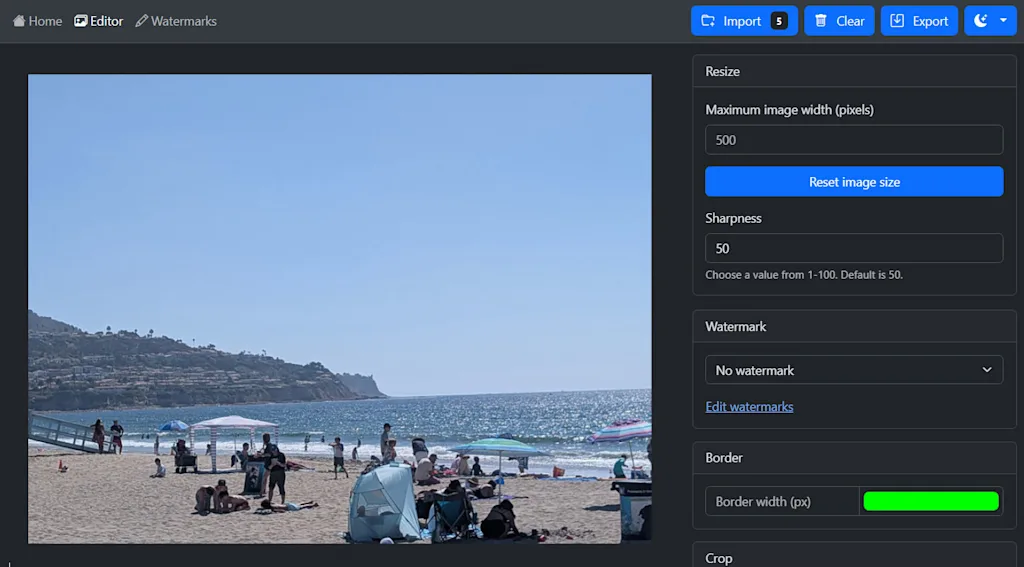
    ➜ The tool is called PhotoStack​, and it’s a web-based app that makes it entirely effortless to edit images in bulk—for instance:

    • Resizing a bunch of images to specific dimensions
    • Making an entire set of images sharper
    • Adding a specific sort of border or even watermark onto a lot of images at once
    • Or removing the data (including, at times, location info) that’s often baked into photos before you share ’em somewhere

    ✅ It couldn’t be much easier to use either.

    • You just open up the PhotoStack website​ . . .
    • Click or tap the “Edit images” button . . .
    • And then either click or tap the “Import” button or just drag and drop images directly onto the page.
    Editing images in bulk is refreshingly easy with PhotoStack’s simple web tool.

    You can then use any of the options on the screen to adjust your images as needed, and any changes you make will be applied to all of the images at the same time.

    When you’re done, all that’s left is to click or tap the “Export” button, and all of your edited images will be saved back onto your device. Told ya it was easy, right?!

    PhotoStack is open source and completely free to use. And, critically, your images are never uploaded anywhere. All of the processing happens in your own browser, on your own device, without any privacy compromises.

    In a world filled with AI sorcery and the endless asterisks that accompany that, it’s a simple, supremely useful tool that’s well worth your while to hang onto for the right occasion.

    • PhotoStack is 100% web-based​—no downloads required. (Though you can install it as a progressive web app for easy ongoing access, if your browser offers that ability; look in your browser’s main menu when the site is open to see if the option is present.)
    • It’s free, with no limits or catches. You can opt to make a donation to support the developer if you like, but it’s never required.
    • And the app doesn’t collect or save any images, require any sort of sign-in, or ask for any manner of personal info. Its privacy policy​ is almost shockingly short and simple.

    Treat yourself to all sorts of brain-boosting goodies like this with the free Cool Tools newsletter—starting with an instant introduction to an incredible audio app that’ll tune up your days in truly delightful ways.


    Source link

    Share. Facebook Twitter Pinterest LinkedIn Tumblr Email

    Related Posts

    This Startup Wants to Bring Concierge Healthcare to the Masses

    July 29, 2026

    Apple Watch Saves Cincinnati Man After He Collapsed at His Home

    July 29, 2026

    12,000 pounds of bacon recalled as USDA slaps product with dreaded ‘Class 1’ designation. Is that serious?

    July 29, 2026
    Top News

    American Eagle is back with Syd and not sorry about it

    By Staff WriterApril 18, 2026

    “What brand am I wearing?” Sydney Sweeney says, looking into the camera as the shutter…

    FIFA World Cup 2026 tickets are on sale. Here’s how to get them

    October 2, 2025

    The new Trump accounts for kids: The good, the bad, and the icky

    July 18, 2026

    What is ‘functional strategy?’ (And should functions even have strategies?)

    October 7, 2025
    Top Trending

    This Startup Wants to Bring Concierge Healthcare to the Masses

    By Staff WriterJuly 29, 2026

    Key Takeaways Max Marchione struggled for years to get a real diagnosis,…

    Apple Watch Saves Cincinnati Man After He Collapsed at His Home

    By Staff WriterJuly 29, 2026

    Mohammad Islam thought he was coming down with something. A few hours…

    12,000 pounds of bacon recalled as USDA slaps product with dreaded ‘Class 1’ designation. Is that serious?

    By Staff WriterJuly 29, 2026

    Bacon lovers, beware. The USDA’s Food Safety and Inspection Service (FSIS) has…

    Categories
    • Business
    • Economy
    • Headline News
    • Top News
    • US Politics
    • World Politics
    About us

    The Populist Bulletin serves as a beacon for the populist movement, which champions the interests of ordinary citizens over the agendas of the powerful and entrenched elitists. Rooted in the belief that the voices of everyday workers, families, and communities are often drowned out by powerful people and institutions, it delivers straightforward, unfiltered, compelling, relatable stories that resonate with the values of the American public.

    The Populist Bulletin was founded with a fervent commitment to inform, inspire, empower and spark meaningful conversations about the economy, business, politics, inequality, government accountability and overreach, globalization, and the preservation of American cultural heritage.

    The site offers a dynamic mix of investigative journalism, opinion editorials, and viral content that amplify populist sentiments and deliver stories that echo the concerns of everyday Americans while boldly challenging mainstream narratives that serve the privileged few.

    Top Picks

    This Startup Wants to Bring Concierge Healthcare to the Masses

    July 29, 2026

    Apple Watch Saves Cincinnati Man After He Collapsed at His Home

    July 29, 2026

    12,000 pounds of bacon recalled as USDA slaps product with dreaded ‘Class 1’ designation. Is that serious?

    July 29, 2026
    Categories
    • Business
    • Economy
    • Headline News
    • Top News
    • US Politics
    • World Politics
    Copyright © 2025 Populist Bulletin. All Rights Reserved.

    Type above and press Enter to search. Press Esc to cancel.