Close Menu
    Facebook X (Twitter) Instagram
    TRENDING :
    • New Balance’s secret to winning? Think like a challenger
    • Inside the ambitious plan to undo DOGE’s damage
    • Google Glass, Amazon Fire, Friendster: Why great ideas from successful companies fail
    • Three habits undermining your executive presence
    • Domestic Demand Wanes In China
    • Solopreneurship can be dream come true for many. But there’s a hidden cost
    • Germany’s Merz Admits To “Serious Strategic Mistake”
    • Employees in Minnesota are afraid to show up to work
    Compatriot Chronicle
    • Home
    • US Politics
    • World Politics
    • Economy
    • Business
    • Headline News
    Compatriot Chronicle
    Home»Business»5 time-saving Google Calendar tricks you should be using
    Business

    5 time-saving Google Calendar tricks you should be using

    October 15, 20253 Mins Read
    Share Facebook Twitter Pinterest LinkedIn Tumblr Telegram Email Copy Link
    Follow Us
    Google News Flipboard
    Share
    Facebook Twitter LinkedIn Pinterest Email


    If you’re still using Google Calendar like it’s 2009—just punching in appointments and letting it ride—you’re leaving productivity on the table.

    While we’re all drowning in digital noise, the single best thing you can do is carve out some actual, useful time. These five tricks are simple to implement, and they turn your basic calendar into a surprisingly effective time-management copilot.

    So, stop scheduling and start planning.

    The shortcut-iest shortcuts

    You know what’s less efficient than a two-hour conference call? Constantly clicking the “Create” button or dragging your mouse to the next available time slot.

    Instead, just hit the C key on your keyboard.

    The event creation box pops up instantly, ready for you to title your meeting and select a time. It’s basic, but the cumulative time savings of not having to drag the pointer to the left-hand corner of your screen for the ten-thousandth time is non-trivial.

    Also, while you’re at it, hit T to jump straight back to today’s date, and check out other useful shortcuts here.

    Block out ‘Focus Time’

    We all have a task list that never ends. You need two hours to write that report, but your calendar is a patchwork quilt of calls, reminders, and “quick syncs.” If it’s not on the calendar, it doesn’t exist.

    Carve out some actual work time by scheduling a Focus Time event. Note that for this to work, you’ll need a Business, Enterprise, Education, or Nonprofit Google Workspace account.

    In the past, you’d just block off the time. Now, Google Calendar has a specific Focus Time event type. It’s like a regular event, but it gives you an option to automatically decline any conflicting invitations during that block.

    Use it, abuse it, and get something done.

    Color-code your events

    Your work calendar is a mess of identical blue events. Is that blue dot a mandatory team meeting, or just a reminder to take the recycling out? You have to click it to know.

    Instead, assign a color to specific types of events.
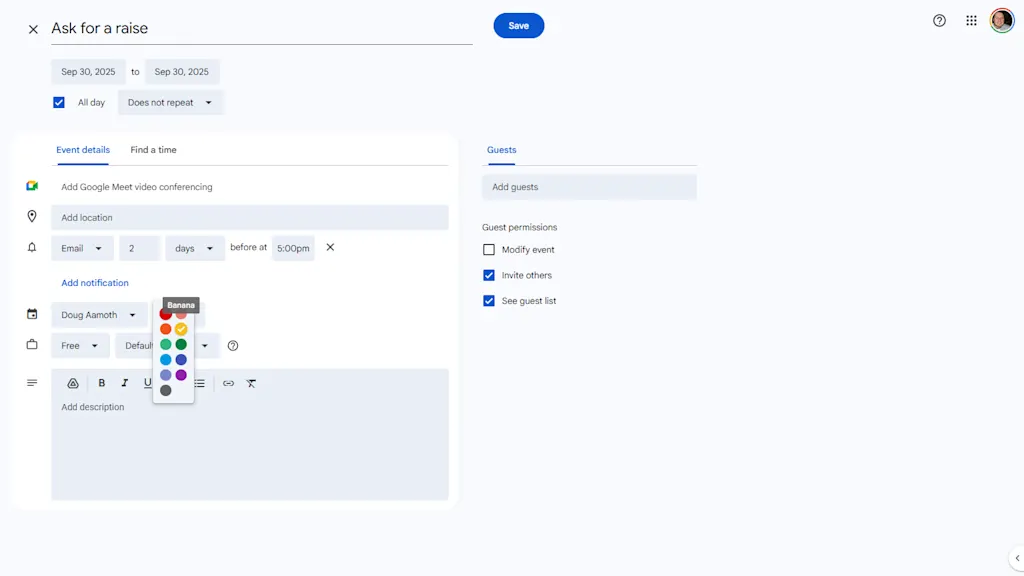
    When editing an event, change its color next to your name about half-way down the modal. I like to use red for anything that’s a “Hard Stop” or external meeting, green for personal stuff, and yellow for internal work things.

    Now, when you glance at your week, you can instantly see the type of week you’re having: a color-coded visual indicator of your commitments.

    Schedule meetings without herding cats

    Let’s be honest: The absolute worst part of scheduling a meeting isn’t the meeting itself, it’s the five emails and three Slack messages that happen before the meeting, all dedicated to the question, “When are you free?”

    You’re not a reservation agent. Use the “Find a Time” feature instead.
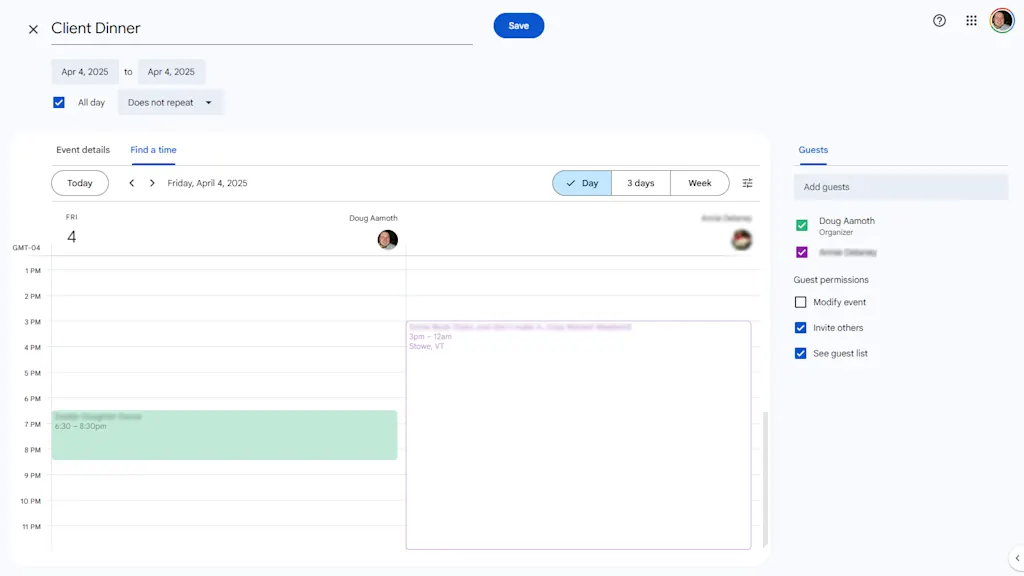
    When you create an event and add your guests, click on the “Find a Time” tab right next to “Event Details.”

    Google Calendar instantly overlays the schedules of everyone you invited, so you can see exactly who is busy and who is free and at which times. Drag the event block to the first open slot that works for everyone.

    Build in some breaks

    The bane of modern office life is an entire day of back-to-back, 30-minute meetings. No time for lunch. No time for the bathroom. No time for . . . well, anything.

    Don’t be a time miser. Instead, go to Settings > General > Event settings > Default Duration and click the “Speed meetings” box.
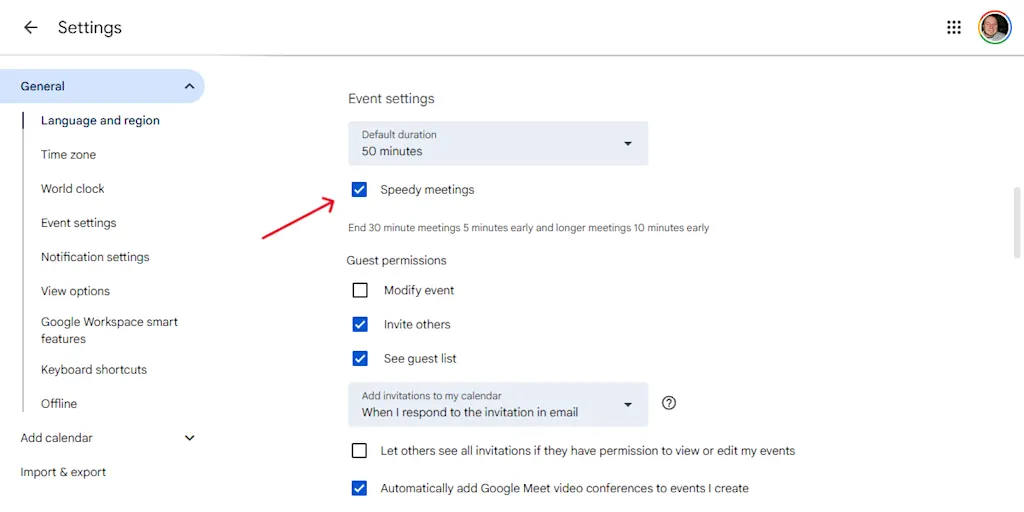
    This is a subtle but powerful change. Now, when you create an event, it automatically stops five or ten minutes before the hour.

    You and your attendees get a break and a chance to prep for the next call. In a world insane with meetings, it’s a small victory for sanity.


    Source link

    Share. Facebook Twitter Pinterest LinkedIn Tumblr Email

    Related Posts

    New Balance’s secret to winning? Think like a challenger

    January 21, 2026

    Inside the ambitious plan to undo DOGE’s damage

    January 21, 2026

    Google Glass, Amazon Fire, Friendster: Why great ideas from successful companies fail

    January 21, 2026
    Top News

    How a family-owned costume shop is adapting to Trump’s tariffs this Halloween season

    By Staff WriterOctober 11, 2025

    With Halloween on the horizon, Chicago Costume is stuffed. Packaged costumes, including superheros and Japanese…

    Stressed about shopping for holiday gifts? These ‘consumer wisdom’ tips can help

    November 15, 2025

    CisionOne Enhances PR Tools with AI-Powered Insights and Social Features

    September 21, 2025

    This week in business: Markets, machines, and mosquitoes

    October 25, 2025
    Top Trending

    New Balance’s secret to winning? Think like a challenger

    By Staff WriterJanuary 21, 2026

    Back on December 15th, Dallas Mavericks rookie Cooper Flagg became the youngest…

    Inside the ambitious plan to undo DOGE’s damage

    By Staff WriterJanuary 21, 2026

    A group of former government workers are developing a plan that a…

    Google Glass, Amazon Fire, Friendster: Why great ideas from successful companies fail

    By Staff WriterJanuary 21, 2026

    In the world of business, we tend to believe that success is…

    Categories
    • Business
    • Economy
    • Headline News
    • Top News
    • US Politics
    • World Politics
    About us

    The Populist Bulletin serves as a beacon for the populist movement, which champions the interests of ordinary citizens over the agendas of the powerful and entrenched elitists. Rooted in the belief that the voices of everyday workers, families, and communities are often drowned out by powerful people and institutions, it delivers straightforward, unfiltered, compelling, relatable stories that resonate with the values of the American public.

    The Populist Bulletin was founded with a fervent commitment to inform, inspire, empower and spark meaningful conversations about the economy, business, politics, inequality, government accountability and overreach, globalization, and the preservation of American cultural heritage.

    The site offers a dynamic mix of investigative journalism, opinion editorials, and viral content that amplify populist sentiments and deliver stories that echo the concerns of everyday Americans while boldly challenging mainstream narratives that serve the privileged few.

    Top Picks

    New Balance’s secret to winning? Think like a challenger

    January 21, 2026

    Inside the ambitious plan to undo DOGE’s damage

    January 21, 2026

    Google Glass, Amazon Fire, Friendster: Why great ideas from successful companies fail

    January 21, 2026
    Categories
    • Business
    • Economy
    • Headline News
    • Top News
    • US Politics
    • World Politics
    Copyright © 2025 Populist Bulletin. All Rights Reserved.

    Type above and press Enter to search. Press Esc to cancel.